There is a specific point in every service business funnel where the visitor is finally ready. They have read the page, they trust you, and they reach for the button that says “Book a call” or “Reserve a spot.” That click is the most valuable moment on the whole site.
And the most common way to handle it is to throw it away. The button opens a new tab on someone else’s domain, with someone else’s logo in the corner, someone else’s cookie banner, and a layout the visitor has never seen before. The sale was happening on your site. Now it is happening on a scheduling company’s site.
This post is about closing that gap: keeping the booking where the trust was built, on your own Webflow domain, and what you get to keep as a result.
The redirect tax
A redirect looks harmless. It is one click, the page loads quickly, the booking still happens. But every handoff costs something, and a few of those costs are worth naming.
The first is trust. A visitor who has spent two minutes on your carefully designed site suddenly lands on a generic page that does not look like you. Some people book anyway. Some hesitate, because the jump reads as “this small business does not really run its own booking.” You never see the ones who quietly close the tab.
The second is context. On your own page, the booking widget sits next to your copy, your testimonials, your pricing. On a redirect, all of that is gone. The visitor is now looking at a bare calendar with none of the reasons they were about to say yes.
The third is ownership, and it is the one that compounds. When the booking lives on a third-party domain, the customer relationship and the booking record live there too. You are renting the most important step in your funnel.
What WhenTap does instead
WhenTap embeds the booking flow directly on your Webflow site. You drop in a small embed, and the visitor picks a service, a staff member, a date, and a time without ever leaving your domain. Same URL, same header, same brand.
Under the hood it is a lightweight widget, not an iframe pointed at an external booking page. It reads your real availability, shows only genuinely open slots, and confirms the booking in place. To the visitor it feels like your site grew a booking feature, because it did.
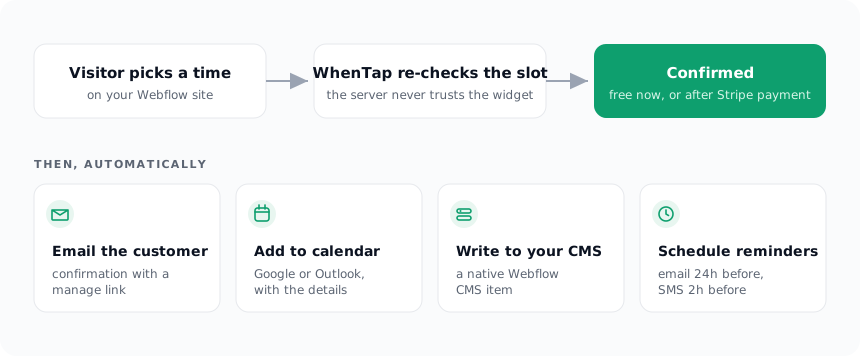
The difference is not cosmetic. The person books while still surrounded by the reasons they came to book. Nothing about the flow suggests they left your business to talk to a scheduling company.
The slot is real, or it is not offered
Keeping the flow on your domain only helps if the times shown are trustworthy. A booking widget that offers a slot and then says “actually, taken” is worse than a redirect.
WhenTap computes availability from your real rules minus your real bookings minus your buffers, and it holds the slot the instant someone starts to pay. If two people reach for the same time, the second one sees “That time was just taken. Please pick another,” not a double booking. The calendar you show is the calendar that is actually open.
From building WhenTap: we tested this the blunt way, firing two booking requests at the exact same slot. The server re-derives availability at the moment of booking rather than trusting whatever the widget last showed, so the first request wins with a confirmed booking and the second comes back with a
409and a “that time was just taken.” The race resolves to one booking, never two, because the slot is re-checked server-side on the way in.
That reliability is what lets the widget sit on your own page without embarrassing you. The whole point of keeping the booking local is defeated if the local experience is flaky.
What you keep
When the booking happens on your domain, a few things stay yours that otherwise would not.
The customer relationship stays yours. The visitor books with your business, on your site, and the confirmation comes from you. There is no third-party brand inserting itself between you and the person who just booked.
The booking record stays yours, in a place you already own. WhenTap can write every booking back into your Webflow CMS as a draft item: the service, the customer, the staff member, the date, the status. That is covered in depth in a separate post, but the short version is that your bookings become native Webflow content you control, not rows in an account you would lose access to if you stopped paying.
And the money stays yours. When a service requires payment, the charge runs through your own connected Stripe account with no platform cut. The customer pays you, on your site, into your account.
The uninstall test
A good way to judge any tool bolted onto your site is to ask what happens the day you remove it.
Remove a redirect-based scheduler and the booking step of your funnel simply vanishes, along with the customer records that lived in its dashboard. You are starting over.
Remove WhenTap and your Webflow site is still your Webflow site. The bookings it wrote into your CMS are still there, because they are native Webflow items. The services and staff you modeled as Collections are still there, because they were always your content. WhenTap was doing the scheduling, but it was never holding your data hostage to do it.
That is the test worth applying to anything that touches the moment a customer says yes. The booking should happen where the trust was built, the record should land somewhere you own, and walking away should never mean losing what your customers gave you. Keeping the booking on your own domain is where all three of those start.