If you charge for your time, the booking and the payment are really one action. A confirmed appointment that has not been paid for is a maybe, and a payment with no appointment attached is a support ticket waiting to happen. So the booking flow has to handle money, and the honest question to ask any tool that does is: who actually ends up with the money, and how much of it.
WhenTap’s answer is that the money is yours, in full, in your own account. This post explains how paid bookings work: connecting Stripe, marking a service as paid, what happens to a slot while a customer is at checkout, and how cancellations are refunded without you touching anything.
Your Stripe, not ours
WhenTap uses Stripe Connect, which means you link your own Stripe account and charges run through it directly. The customer pays into your account. You are the merchant of record. Payouts arrive on your Stripe schedule, to your bank.
The number that matters here is the platform fee, and WhenTap’s is zero. When a customer pays for a booking, the charge is created on your connected account with the application fee set to nothing. WhenTap does not skim a percentage of your bookings. The only deduction is Stripe’s own standard processing fee, which you would pay taking a card payment any other way.
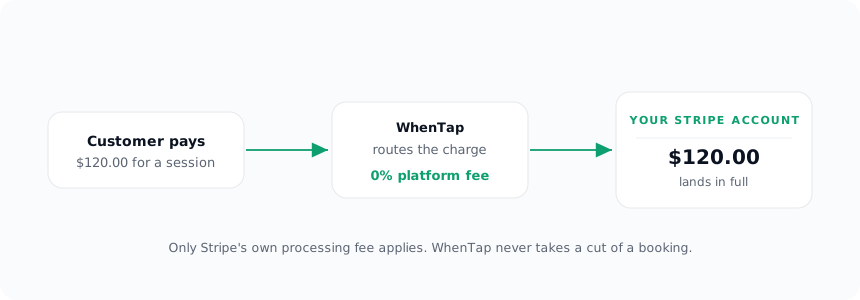
This is worth being precise about, because “free to start” and “no transaction fees” are not the same promise. WhenTap charges for the subscription and takes nothing per booking. A $120 session bills the customer $120, and $120 (less Stripe’s processing fee) lands with you.
From building WhenTap: we proved the 0% claim the only way that counts, by running a real test payment and watching where it landed. The charge is created on the connected account with the application fee set to zero, so the full amount (less Stripe’s own processing fee) settled to the connected Stripe and WhenTap’s own balance moved by nothing. The twist we hit was on the notification side, not the money side: a connected-account payment reports back to a different webhook endpoint than a platform one, which turned into a story of its own.
Marking a service as paid
Payment is set per service, not globally. Each service can be free, or it can require payment, with a price. A free consultation and a paid session can live side by side on the same site, and only the paid one sends the customer to checkout.
A booking only asks for payment when three things are true at once: the service is marked as requiring payment, it has a price above zero, and you have connected Stripe. If any of those is missing, the booking simply confirms for free rather than getting stuck. A price with no Stripe connection does not trap the customer at a broken checkout, it just books.
The slot is held, not given away
Here is the timing problem every paid booking has to solve. A customer picks a time and heads to checkout. For the next minute or two, is that slot taken or not?
If you release it, two people can pay for the same time. If you hold it forever, one abandoned checkout can block a slot indefinitely. WhenTap threads this by creating the booking in a pending state the moment checkout starts. The slot is held, and it disappears from the availability everyone else sees. The booking only flips to confirmed when Stripe reports the payment succeeded.
So a customer who completes payment gets a confirmed booking and their reminders. A customer who abandons checkout leaves a pending booking that was holding the slot, not a confirmed one you have to chase. The person at the front of the line keeps their place while they pay, and nobody behind them can grab the same time.
Cancellations refund themselves
The reverse of taking a payment is giving it back, and that is where manual processes quietly fail. Someone cancels, and refunding them is a task on a list that a busy week swallows.
When a paid booking is cancelled, WhenTap issues the refund automatically against your connected Stripe account. It resolves the original payment and refunds it, marks the booking as refunded, and the customer is told, on the cancel screen, that if they paid a refund has been issued. You do not open Stripe, find the charge, and click refund. The cancellation does it.
Alongside the refund, cancelling also stops any scheduled reminders and removes the appointment from the connected calendar, so a cancelled paid booking does not leave a reminder or a stale calendar hold behind. The cancellation is complete, not half done.
Why the zero-cut model is the point
It would be easy to take a small slice of every booking. Plenty of tools do, and on a busy site that slice adds up fast. WhenTap deliberately does not, and the reason is the same principle that runs through the rest of the product: the tool should extend your business, not tax it.
Your customers are yours. Your Stripe account is yours. The full payment is yours. WhenTap earns its keep from a predictable subscription, not from a cut of your revenue that grows every time you succeed. You can price a service, connect Stripe, take a payment, and know that what the customer paid is what you keep, minus only what the card networks charge everyone. That is the whole arrangement, and there is nothing hidden in it.