The fastest way to lose trust in a booking tool is for it to be off by an hour. The customer booked 9:00, the calendar says 10:00, someone waits, someone does not show, and both people blame each other. It looks like carelessness, but it is almost always the same underlying bug: the software treated a wall-clock time as if it meant the same thing everywhere.
Scheduling across timezones and daylight saving is deceptively hard, and it is the single most common thing booking tools get wrong. This post explains how WhenTap handles it, and why the approach holds up on the days that break naive implementations, like the Sunday the clocks change.
Why a time is not just a time
“9:00 on Tuesday” is not enough information to book anything. Nine in the morning where? The customer might be in New York, the staff member in London, and the server somewhere else entirely. Three people, three different meanings for the same four characters.
The classic bug is to store “9:00” and then display “9:00” to everyone, as if it were universal. It works perfectly in testing, because the developer, the test customer, and the server are all in one timezone. It falls apart the first time a real customer in a different zone books a real appointment, and nobody notices until someone is an hour early or an hour late.
The fix is conceptual before it is technical: a booking is not a wall-clock time, it is a single moment in time that different people describe with different clock readings.
One true instant, stored in UTC
WhenTap stores every appointment as one absolute instant, in UTC, the timezone that never shifts. That stored moment is the source of truth. It does not depend on where the customer is, where the staff member is, or where the server is.
Everything a person sees is a conversion from that instant into their own timezone. The customer in New York who books 9:00 their time creates the instant 13:00 UTC. The staff member in London, looking at the same booking, sees 2:00 in the afternoon their time. Same instant, two honest local readings, no contradiction.
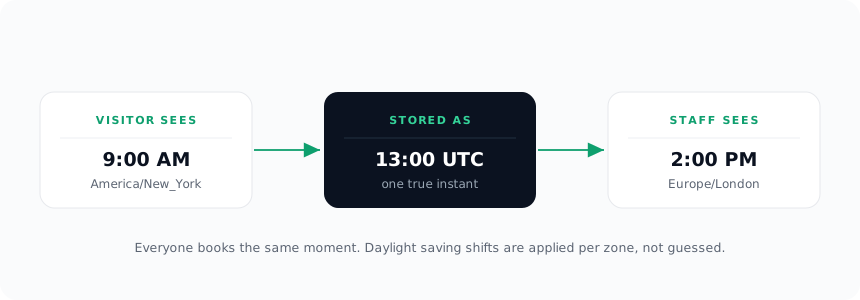
Because there is exactly one stored truth and every display is derived from it, there is no version of the appointment that is “wrong.” There is just the instant, and the timezone you happen to be reading it in.
The visitor’s timezone, detected and adjustable
For the conversion to be right, WhenTap has to know the visitor’s timezone. The booking widget detects it automatically from the visitor’s browser, so the times a customer sees default to their own local clock without them doing anything.
Automatic detection is right the vast majority of the time, but it is offered, not forced. A visitor booking for someone in another city, or travelling, can see and adjust the timezone the slots are shown in. The default is convenient; the override keeps it honest for the cases the default gets wrong.
The day the clocks change
Daylight saving is where “close enough” implementations finally break, so it is worth walking through why WhenTap does not.
The naive approach stores an offset, like “UTC minus 5,” alongside a time. That is fine until March or November, when the offset for a given city changes overnight. An appointment booked in winter and held into summer is suddenly an hour off, because the stored offset no longer matches reality.
WhenTap does not store an offset. It stores the absolute instant and converts using the full timezone rules for each zone, which include when that zone’s daylight saving transitions happen. So “9:00 in New York” resolves to the correct UTC instant whether the booking is in January or July, because the conversion knows New York’s rules on that specific date. The clocks changing does not shift anyone’s appointment, because the appointment was never pinned to an offset in the first place.
This is the difference between subtracting five hours and asking “what does the clock in New York actually read at this instant, on this date, under this zone’s rules.” Only the second one survives a daylight saving transition without drifting.
From building WhenTap: the scheduling engine ships with a suite of tests aimed squarely at the days that break naive code, including the spring-forward Sunday when the clock jumps from 1:59 straight to 3:00 and 2:30 simply does not exist. A slot that would land in that missing hour has to be skipped, not silently shifted an hour, and pinning a test to that exact Sunday is what lets us change the engine later without quietly reintroducing the oldest scheduling bug there is.
Why this is foundational, not a feature
You will not find “handles timezones correctly” as a bullet on the pricing page, and that is deliberate. It is not a feature you turn on. It is the floor the whole product stands on.
Every open slot the widget offers, every confirmation, every reminder sent 24 hours before, every calendar event pushed to Google or Outlook depends on the underlying instant being unambiguous. Get that wrong and everything built on top inherits the error. Get it right, and none of the features above have to think about timezones at all, because the hard part was solved once, at the bottom.
That is why WhenTap treats every appointment as a single UTC instant, converts per zone using real daylight saving rules, and shows each person their own local time. Not so it can be advertised, but so that the customer who books 9:00 and the staff member who shows up are talking about the same moment, on every day of the year, including the two Sundays when the clocks move.