“Syncs with your calendar” is on every scheduling tool’s feature list. What that phrase hides is that calendar sync is two separate jobs pointing in opposite directions, and that the whole thing rests on an OAuth token that can quietly stop working. Get either half wrong and the symptom is the same: a double booking, or an appointment that never made it onto anyone’s calendar.
This is a build-log on how WhenTap does two-way sync for Google Calendar and Microsoft Outlook, including the specific failure we ran into wiring it up, and what we changed because of it.
What “two-way” actually means
Two-way sync is two flows, and they are genuinely independent:
- Push (out): when someone books on your site, WhenTap creates a calendar event on the assigned staff member’s Google or Outlook calendar, with the customer’s details, and removes it again if the booking is cancelled.
- Pull (in): before WhenTap offers any slot, it reads that staff member’s existing busy times from the same calendar. If they have a dentist appointment at 2pm on their own calendar, 2pm never shows up as bookable on your site.
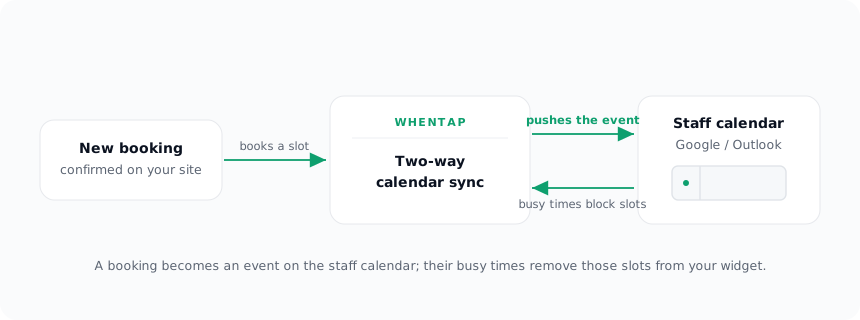
The push half is what people picture. The pull half is what actually prevents double bookings, and it is the one cheaper tools skip, because reading an external calendar’s free/busy on every availability query is more work than just firing an event when a booking happens.
The failure mode nobody warns you about
Both flows depend on one thing: a valid OAuth token for that calendar. And OAuth tokens are not forever.
From building WhenTap: we connected a real Google account and a real Outlook account to the same staff setup, booked a test appointment, and watched it land cleanly on Outlook, and not on Google. No error in the UI, nothing obviously broken. The booking was confirmed, the Outlook event was there, and Google just… wasn’t. The push had silently no-oped for one provider and not the other.
The cause was not our sync code. It was invalid_grant coming back from Google’s token endpoint. When a Google OAuth app is still in “Testing” mode (which every app is before it goes through Google’s verification), refresh tokens expire after seven days. Our refresh token had aged past that window, so the access-token refresh failed, and the event push had nothing valid to authenticate with. Outlook’s token was still good, so Outlook kept working, which is exactly why the failure looked so lopsided and confusing.
This is the kind of thing you only learn by running the integration for real, past day seven, with two providers side by side. It is not in the “add calendar sync” tutorial, because the tutorial’s token is always fresh.
Failing loud instead of failing silent
The original behavior was defensible on paper: never let a flaky calendar break a booking. So a failed push was caught and swallowed, and the booking still confirmed. Good instinct, wrong outcome, because “swallowed” meant the business had no idea one of their calendars had gone dark.
So we changed two things. First, the swallowed error now logs the provider and the reason, so a dead connection is diagnosable instead of invisible. Second, and more importantly, when a token refresh comes back invalid_grant, we now flag that connection as needing reconnection and surface it in the panel: the calendar’s chip turns amber and reads “reconnect,” with a one-line note that a connection needs attention. One click re-runs the OAuth consent and the flag clears itself on the next successful refresh.
The booking still never breaks on a calendar problem. But now the owner finds out on the same day, in the place they manage staff, instead of discovering it three weeks later when someone gets double-booked. (The real fix for the seven-day clock is getting the Google app verified and out of Testing mode, which stops the expiry entirely, but surfacing reconnects is the safety net for every other way a token can die: a revoked grant, a changed password, a removed calendar.)
Reading busy times back, and proving it works
The pull direction is easy to claim and easy to fake, so we verified it end to end rather than trusting it.
From building WhenTap: we put a single busy block on a connected calendar from 08:30 to 09:00, then queried WhenTap’s availability for that staff member on that day. The 08:30 slot was gone from the returned slots, and the surrounding times were still open. The external event had flowed all the way through: read from the calendar, merged into the busy set, and subtracted from the offered slots, with no booking of ours involved.
That round-trip, an event that exists only on the staff member’s own calendar removing a slot from your public widget, is the entire point of two-way sync. Without it, “calendar sync” just means you get a nice event created after the fact, while your widget happily offers times the person is already busy.
Why this is worth the extra work
Every open slot WhenTap shows is the intersection of three things: the staff member’s working hours, the bookings already made through WhenTap, and their real busy time from Google or Outlook. Drop that third input and you are back to the oldest scheduling bug there is, offering a time that is not actually free.
Two-way sync is what keeps a booking on your Webflow site honest about the person’s whole calendar, not just the part WhenTap happens to know about. And surfacing reconnects is what keeps it honest on day eight, when the token that made it all work quietly expired. For the mechanics of connecting a calendar, see Connecting calendars; for where sync sits in the wider booking flow, see How booking works. Payments have a similar “the event went where you didn’t expect” lesson, told in the paid booking that said pending.