Most Webflow sites for service businesses already have the raw material of a booking system sitting in the CMS. There is a Services Collection powering the pricing page. There is a Team Collection powering the about page. Sometimes there is a Locations Collection powering a map. The site already knows what you offer and who offers it. It just does not know how to take a booking against any of it.
WhenTap connects those two halves. Instead of asking you to re-enter your services and staff into yet another dashboard, it treats your existing Webflow Collections as the source of truth for what is bookable. This post walks through how that mapping works going in, how bookings come back out, and why keeping the CMS as the source of truth is the whole point.
The CMS is already your source of truth
Think about where you edit your business today. When you change a price, rename a service, or add a team member, you do it in the Webflow CMS, because that is what your public site renders from. The CMS is already the place your business is described accurately, because it has to be.
So the worst thing a booking tool can do is create a second copy. Now you have services in Webflow and services in a scheduling app, and every price change is two edits, and the day you forget the second edit is the day someone books at the wrong price.
WhenTap avoids that by pointing at the Collection you already maintain, rather than asking you to keep a parallel list.
Mapping a Collection to bookable resources
Connecting a Collection is a matter of telling WhenTap which field means what. You pick your Services Collection, then map its fields: which one is the service name, which is the duration, which is the price. WhenTap suggests matches by field name to save you the guesswork, and you confirm.
From that point on, each item in the Collection becomes a bookable service. The same works for staff and for locations. Your Team Collection becomes the set of people a visitor can book with. Your Locations Collection becomes the set of places, including the “we come to you” case where the visitor gives you their address instead of picking a room.
The mapping is deliberate rather than magic. You decide which Collection and which fields, so nothing bookable appears that you did not intend.
Edits flow in within seconds
Once a Collection is mapped, keeping it current is not your job anymore. When you edit a Collection item in Webflow, WhenTap hears about it through a Webflow webhook and updates the matching resource within seconds. Rename a service, change its duration, adjust a price, and the booking widget reflects it almost immediately.
Webhooks are the fast path, but they are not the only path. WhenTap also re-reads every mapped Collection on a schedule, so even if a single webhook is missed, nothing drifts for long. A missed event cannot leave your bookable services stale, because the periodic re-pull catches up.
The result is that you keep doing what you already do, editing your site in Webflow, and your booking system stays correct as a side effect.
Bookings flow back as draft CMS items
The mapping runs the other way too, and this is the part that surprises people.
When a booking is made, WhenTap can write it back into a Collection in your Webflow CMS as a new item. Not a row in an external database you cannot see, a real Webflow CMS item. The service, the customer name, the email, the assigned staff member, the date and time, and the status all land in fields you map.
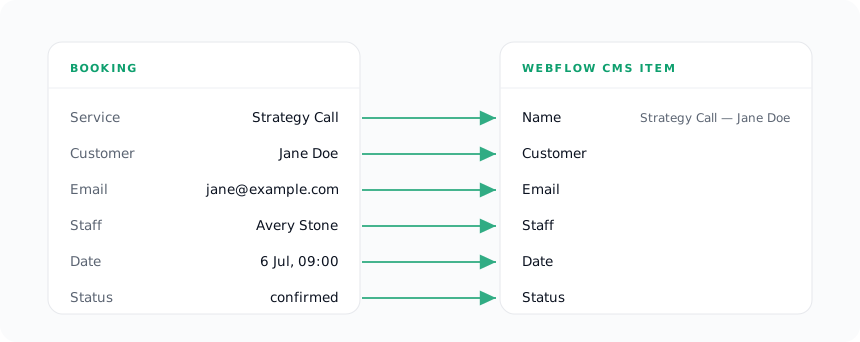
Crucially, WhenTap writes these back as drafts. The item is created unpublished, so it lands in your CMS for you to review rather than appearing live on your site the moment someone books. You decide whether bookings are internal records or something you surface publicly. Nothing goes live behind your back.
From building WhenTap: we tested this against a real Webflow site rather than a mock, creating and then cleaning up actual draft items to prove the round-trip end to end. One detail only surfaced once real items existed: Webflow requires every CMS item to carry a name and a slug that is unique within its Collection. Two bookings for the same service would collide on the obvious slug, so WhenTap builds the slug from the booking and suffixes it with a slice of the booking’s id, guaranteeing uniqueness without you ever having to think about it.
Because these are native CMS items, everything Webflow can do with a Collection, you can now do with your bookings. Filter them, sort them, build an internal Collection page that lists upcoming appointments, or just use them as a durable record. They are your content, in your CMS.
Why source of truth matters
There is a design decision underneath all of this, and it is worth stating plainly: the CMS is the source of truth, and WhenTap extends it rather than replacing it.
That choice is what makes the tool safe to adopt. Your business description does not move into an app you have to log into. It stays in Webflow, where it already lived, and WhenTap reads from it and writes to it. You are never maintaining two truths and hoping they agree.
It is also what makes the tool safe to leave. If you ever uninstall WhenTap, the Collections it read from are untouched, because they were always yours. The bookings it wrote back are still sitting in your CMS as items, because they are Webflow content, not WhenTap content. Nothing you built or collected disappears with the app.
That is the test any Webflow tool should pass. It should meet your site where it already is, keep a single source of truth, and leave your data exactly where it found it if you walk away. Treating the CMS as the booking engine, rather than a place to copy data out of, is how WhenTap passes it.