Ask any service business what a booking tool most needs to get right and they will say “do not double-book me.” The less obvious cousin of that request is “do not book me back-to-back with no gap,” and it is handled by a small setting called buffer time. It is easy to add as an option and surprisingly easy to get subtly wrong, because a buffer only does anything if the schedule genuinely reserves it. We found out exactly how subtle while testing WhenTap.
What a buffer is for
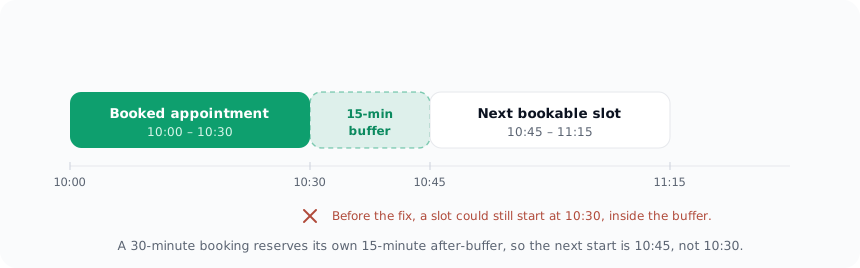
A buffer is padding around an appointment. A 30-minute session with a 15-minute after-buffer should occupy 45 minutes of the staff member’s day: 30 for the customer, 15 to write notes, reset the room, or just breathe before the next person. The customer only sees the 30, but the calendar has to protect the whole 45.
The point of the buffer is entirely about what happens next. If someone books 10:00, the next bookable start should not be 10:30, the instant the session ends. It should be 10:45, after the buffer. Offer 10:30 and you have handed your staff member two appointments with no gap, which is the exact thing the buffer existed to prevent.
The bug: the buffer that was not reserved
Here is where it got subtle. WhenTap applied the buffer when working out whether a new candidate slot would fit. But existing bookings were being stored as busy only for their raw start-to-end time, with no buffer attached. So a booking held its 30 minutes, and quietly let its 15-minute buffer go unclaimed.
The result: the slot immediately after a booking ended was still on offer, sitting right on top of the buffer that was supposed to be there.
This is the kind of bug that survives casual testing effortlessly. Book one appointment, glance at the calendar, everything looks fine, the slot is taken. You only see the problem when you look at the specific slot one step past the booking and ask whether it should really be open. Most manual testing never asks that precise question.
From building WhenTap: this one was caught by a test, not by eye. Our availability suite books an appointment at a known time and then asserts two things about its neighbours: the slot at start-plus-30 must be gone, and the slot at start-plus-60 must still be open. On the day we wrote it, that test failed, start-plus-30 was still bookable, which is how a real buffer bug surfaced instead of shipping. The assertion was deliberately aimed at the boundary, because the boundary is the only place this bug lives.
Why it happened, and the fix
The root cause was an asymmetry. The buffer was treated as a property of the slot being requested, but not as a property of the bookings already on the calendar. Availability is a subtraction, open time minus everything already spoken for, and one side of that subtraction was missing its buffers.
The fix was to make each existing booking reserve its own full footprint. When WhenTap builds the busy set for a staff member, every booking now expands to cover its before-buffer and after-buffer as well as its actual time. A booking from 10:00 to 10:30 with a 15-minute after-buffer becomes busy from 10:00 to 10:45. The buffer is no longer a hopeful setting applied in one direction, it is real reserved time on both sides, symmetrically, so the gap a booking is supposed to create is a gap nobody else can book into.
Why the boundary test earns its keep
There is a broader lesson here about testing schedules. The bugs that matter in availability almost never live in the middle of a block, they live at the edges: the slot exactly adjacent to a booking, the minute a buffer ends, the boundary of the minimum-advance window, the instant a daylight-saving change lands. A test that books something and checks it is taken proves very little. A test that books something and checks the slot one step past its buffer is the one that catches a real bug.
That is why WhenTap’s availability tests are written against the boundaries rather than the happy middle. Buffers, minimum advance, and timezone edges are all verified at the exact points where an off-by-a-little error hides. It is more tedious to write a test that knows a 30-minute booking with a 15-minute buffer should free up 10:45 and not 10:30, and that specificity is the entire value. For how buffers and hours are configured, see services, staff and availability; for the wider set of edges availability has to respect, see getting timezones right.