Booking write-back to your CMS
This is the part that makes WhenTap different from every other scheduling tool: your bookings live in your own Webflow CMS. There are two directions, and this page covers both.
- Into WhenTap: your Collections (staff, services, locations) become bookable.
- Back out: every booking is written into a Collection as a native CMS item.
Your Collections become bookable
If you already model your team, services or locations as Webflow CMS Collections, map them to WhenTap in the CMS panel and their items become bookable resources. Your Webflow CMS stays the source of truth. When you edit an item in Webflow, WhenTap picks up the change within seconds through a webhook it registered when you connected. If a webhook is ever missed, a safety-net resync re-reads every mapped Collection every fifteen minutes, so nothing drifts.
Every booking, written back
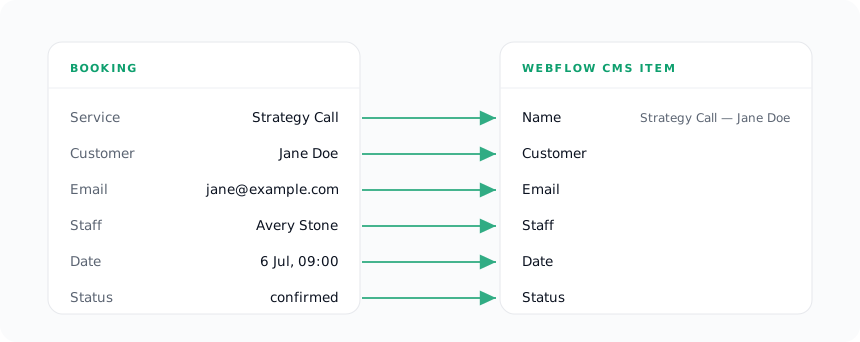
Turn on write-back and each confirmed booking is saved as an item in a Collection you choose, so you can list upcoming appointments on your site, build a dashboard, or drive a Webflow Logic flow, all natively.
Set it up. In the CMS panel, pick the Collection to write bookings into. WhenTap suggests a field mapping automatically by matching your Collection's fields to the booking fields; adjust it if you like. These are the booking fields available to map:
| Booking field | Value |
|---|---|
| Name | "Service — Customer name" |
| Customer | The customer's name |
| The customer's email | |
| Phone | The customer's phone, if given |
| Service | The service name |
| Staff | The staff member's name |
| Date | The start time |
| Status | The booking's status |
Items are created as drafts, so they appear in your Collection ready for you to publish (or publish automatically with a Webflow rule). WhenTap always fills a name and a unique slug so Webflow accepts the item.
It stays in sync
The write-back is not a one-time dump. WhenTap keeps the CMS item in step with the booking:
- On booking, the item is created, once. It is never duplicated.
- On reschedule, the item's date is updated.
- On cancel or a status change (cancelled, completed, no-show), the item's status is updated.
If write-back was off when a booking was made, it simply has no item to update later, turning it on affects new bookings from that point.
When write-back is skipped
Write-back only runs when the site is connected and has a Collection configured. If you pause a site, or its Webflow access needs restoring, WhenTap stops writing until you resume, so it never writes with a stale connection.
For a field-by-field view of everything WhenTap reads and writes, see What syncs where.